

Lab delivery file - SIKB version 14.8.0
Creating a Delivery file and binding them to a customer
This chapter contains the information needed to understand the lab delivery file. A Lab delivery file only has to be updated when there are changes. Otherwise TerraIndex will always show the last imported file.
What is a lab delivery file
A lab delivery file contains the Customer code of the customer that will be sending the lab assignment. It also contains the analyses that can be requested from the a lab by the customer. A Lab delivery file needs to be custom for every user and needs to be a XML file
Example files:
XSD:
Domaintable files: immetingen lookup v14.8.0.xml imsikb0101 lookup v14.8.0.xml
extracted from: https://codes.sikb.nl
File structure
In the image below the main structure of the XML file is shown. Every table is described in more detail later on in this chapter.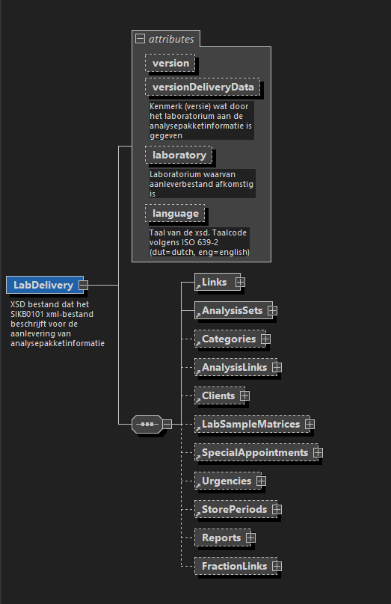
| Attribute name | Description | Unit |
| version | SIKB version. This must be: 14.8.0 | string |
| versionDeliveryData | A lab indication of the version of the delivered data for this user. Could be a generation date with version: '12-7-2024' or a version 'v12.1' | string |
| laboratory | A number given by SIKB/TerraIndex to the lab when requesting to connect to TerraIndex Domaintable: Meetinstantie | integer |
| language | The language of the Delivery file content, like the package names, urgencies etc, in a three-letter ISO-639-2 code: - dut = Dutch | string |
| Links | A table to connect the “AnalysisSet” and the “Clients” | - |
| AnalysisSets | A table containing the name and lab code of analysis set | - |
| Categories | A table containing all the possible lab categories | - |
| AnalysisLinks | A table containing all the analyses for an analysis set | - |
| Clients | A table of all the customer codes that are available for the company | - |
| LabSampleMatrices | A table of all the Lab sample Matrices a lab would like to have selectable. | - |
| SpecialAppointments | A table of all the special price agreements besides the default quote. | - |
| Urgencies | A table containing a list of time frames in which the lab results need to be returned | - |
| StoragePeriods | -not in use- | |
| Reports | -not in use- | |
| FractionLinks | -not in use- |
Structure explanation AnalysisSet
This table contains all the analyses packages that your lab supports. The “analysepakketcode” is your own identification code for the analysis packages.
| Attribute name | Description | Unit |
| analysepakketcode | The identification code of the lab for their analysis package code | string |
| omschrijving | The name/description of the analysis package (This will also be shown in the user interface) | string |
| volgorde | Field is redundant and does not have to be filled in | string |
Structure explanation categorieen
“Categorie” does not need a lot of explanation. A category is a group defined by the lab where certain values in the “koppeltabel” can be grouped under. A category is determined by the lab and can be used in the “koppeltabel”
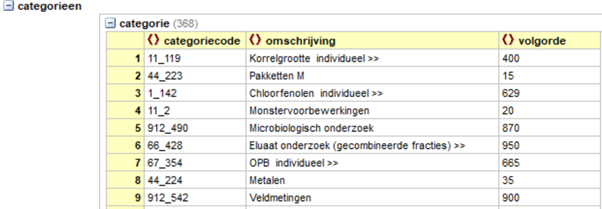
| Attribute name | Description | Unit |
| Categoriecode | The category code of the category of the lab | string |
| Omschrijving | The name/description of the category (This will also be shown in the user interface) | string |
| volgorde | Field is redundant and does not have to be filled in | integer |
Analysetabel
This table contains all the analyses that a analyses package can contain. Be sure the “analysepakketcode” corresponds to a code in the table: “analysepakketten”. The analysecode is your own identification code for the analyses.
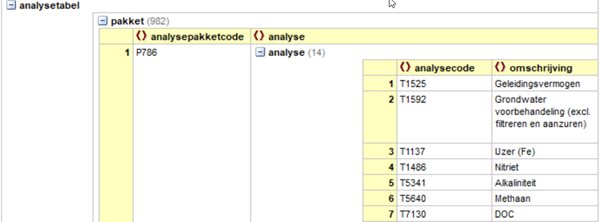
| Attribute name | Description | Unit |
| Analysepakketcode | The analyse package code that corresponds to a code in the “analysepakketten” | string |
| Analyse | A table containing ale the analyses that should be in this analysis package | - |
| Analyse > analysecode | The identification code of the lab for the analyses | string |
| Analyse > omschrijving | The name\description of the analysis (This will also be shown in the user interface) | string |
Structure explanation debiteurtabel
A customer can have multiple “debiteuren”. There always needs to be one “debiteur” so that a lab assignment can be send. But for example when there is a price agreement for a certain project a new “debiteur” can be added. Or when a company has multiple offices every office can have its own “debiteur”
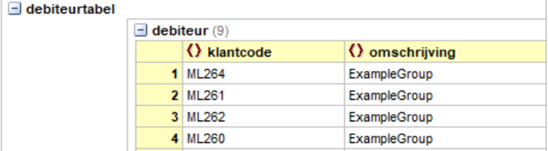
| Attribute name | Description | Unit |
| klantcode | The customer code(s) for the company | string |
| omschrijving | De name\description of the customer code | string |
Structure explanation Links
The “Links” is one of the most important sections of the XML. The “koppeltabel” defines the combination of Analysespackages, custeromcode, categories and sampletype. Without a combination in this table a customer will not be able to send in lab assignments to the laboratory.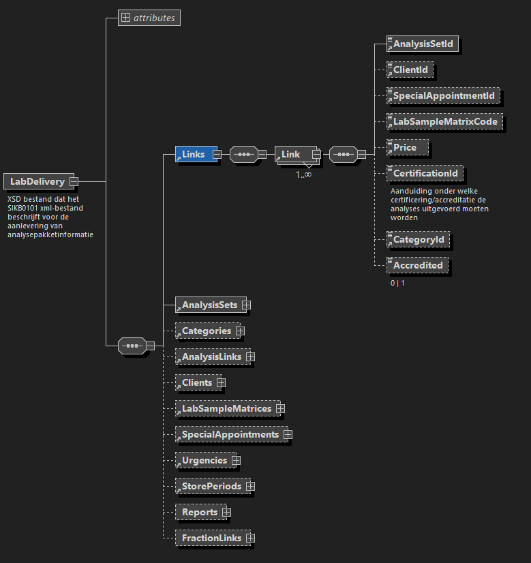
| Attribute name | Description | unit |
| Analysepakketcode | The analysepackagecode that corresponds to a code in the analysepakket | string |
| klantcode | A code that corresponds to a code in debiteuren | string |
| monstersoort | An SIKB code that determins to which matrix the analyses belongs. Sampletype Codegroup 51 in the Attachments for all possible codes | integer
|
| categoriecode | A code that corresponds to a category code in “categorie” | string |
Structure explanation urgentietabel
This table contains a list with different delivery times for analyses results. For example 5 work days, overnight, within 48 hours and so on. The “urgentie code” is a code given by the lab.
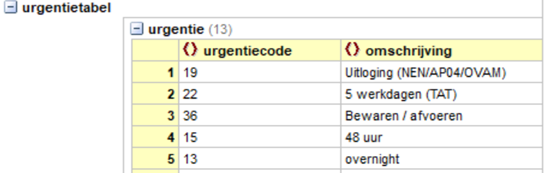
| Attribute name | Description | Unit |
| urgentiecode | The code of the lab for when the analysis results need to be returned to the customer | string |
| omschrijving | The name/ description of the urgentie | string |